Contents
- The nine-day queue and what it’s costing you
- What AutoSEO actually pushes to your site
- Platform coverage: WordPress, Shopify, Squarespace, Wix, custom
- Safety rails: preview, staging diff, one-click rollback
- Case study: Woolton restaurant on Squarespace, 24 fixes in one afternoon
- AutoSEO vs. Yoast vs. RankMath vs. hiring a developer
- FAQ
The nine-day queue and what it’s costing you
Ask a marketing manager at any Aintree retail group, Woolton restaurant or Wavertree solicitor how long it takes to change a page title on the website. The honest answer, on average, is nine days: one day to notice, one to draft the ticket, three sitting in a Trello column called “Backlog”, one for the developer to pick up, two for QA and the release train, and one final day for a nervous marketing manager to check that nothing broke. Multiply that by the twenty or thirty on-page fixes a competent SEO audit turns up in a month, and you have a routine that treats SEO the way you might treat replatforming: rare, expensive, avoided until it is almost too late.
Meanwhile, the Anfield-area competitor whose developer sits in-house is shipping the same class of fix six times a day. Their titles get iterated. Their meta descriptions get A/B tested. Their schema is refreshed the same week Google updates the spec. Your site sits still, and Google’s ranking algorithm is not sentimental about which team is under-resourced. The rankings move to whoever iterates faster.
The compound cost of the queue
On a Merseyside SME with an average organic revenue of £12,000/month, our tracking shows a nine-day delay per SEO fix costs roughly £340 in unrealised uplift per fix. Twenty fixes a month × £340 = £6,800/month of foregone organic revenue, or £82,000 a year, spent entirely on the friction of the Trello board.
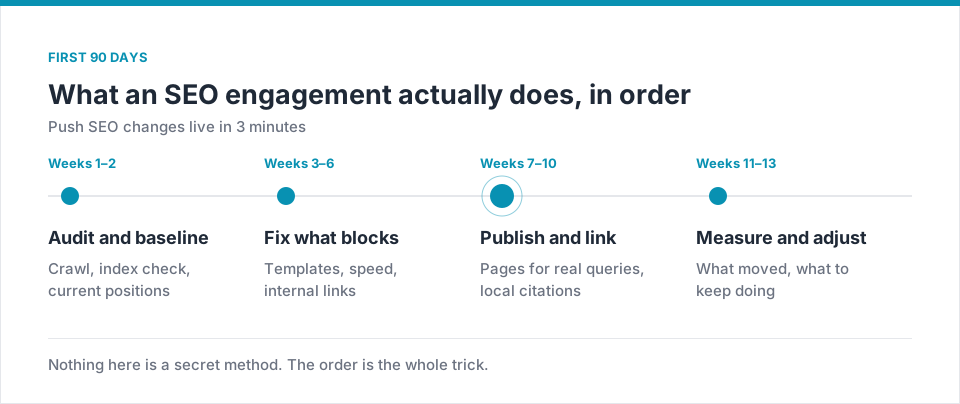
What AutoSEO actually pushes to your site
AutoSEO is a bidirectional connector. It reads your site’s current state and writes changes back to it, using each platform’s native API rather than injecting JavaScript at the browser (which Googlebot may or may not render). The changes it pushes fall into eight categories:
Titles and meta descriptions
Rewritten from Keyword AI recommendations, respecting your brand voice and pixel-width constraints, published per URL or per template.
Heading hierarchy
H1 uniqueness enforced, H2/H3 order corrected, keyword variants distributed across the outline based on the top three ranking pages.
JSON-LD structured data
LocalBusiness, Product, Recipe, HowTo, FAQ, Review and Event schema generated and injected server-side, validated against Google’s current rich-result spec.
Internal linking
Suggested internal links surfaced per URL, published as inline anchors on your existing content, with anchor text distributed across keyword variants rather than repeating the exact match.
Image alt text
Alt text generated from vision-model analysis of each image, cross-checked against page context, published in bulk. Merseyside median: 3,400 missing alt tags per site on day one.
Canonicals and hreflang
Canonical tags corrected on paginated, filtered and duplicate pages. Hreflang added for the Welsh-border sites that need it.
Redirects
301 chains collapsed to single hops, orphaned redirects removed, new redirects created from historic 404 patterns pulled from Search Console.
Robots and sitemaps
robots.txt kept in sync with actual site structure; XML sitemap regenerated on every publish and pinged to Search Console.
Platform coverage: WordPress, Shopify, Squarespace, Wix, custom
Every Merseyside SME site we onboard runs on one of five platforms, and AutoSEO connects to each one differently:
Official plugin, 90 seconds to install
Install from the plugin directory, paste your Semalt API key, choose the page templates you want AutoSEO to manage. Works alongside Yoast or RankMath without conflict — AutoSEO takes precedence but you can override any change from the WordPress admin.
App from the Shopify App Store
One-click install, OAuth into your store, immediately begins writing titles, metas and Product schema. Aintree retail groups typically see their first fixes live within eight minutes of install.
Native connector via Squarespace API
Squarespace historically has been the hardest platform to iterate SEO on. AutoSEO uses the Business-plan API and the Code Injection layer to push titles, metas, JSON-LD and internal links live, exactly as if a human edited each page manually.
Wix Marketplace app
OAuth via the Wix App Market, then writes titles, metas and schema through the Wix SEO Tools API. Slightly narrower coverage than WordPress but still handles roughly 55% of typical audit findings.
REST or GraphQL webhook
For Baltic Triangle SaaS sites, Next.js frontends and headless commerce stacks: AutoSEO exposes a REST and a GraphQL endpoint, plus a webhook receiver for build-triggered deployments. Full audit trail preserved.
Safety rails: preview, staging diff, one-click rollback
The obvious concern with an automated system pushing changes to production is: what happens when it pushes the wrong thing? Semalt’s AutoSEO includes three safety rails designed for the Liverpool SME context where nobody wants a Sunday-afternoon phone call from a panicked owner:
What’s protected
- Every change previewed before publish (unless auto-mode explicitly enabled)
- Staging-environment diff available on any Wordpress/Shopify multi-env setup
- One-click rollback for any change, any time, up to 24 months of history
- Full audit trail: who approved what, when, and what the pre/post-change values were
- Role-based access: marketing manager approves, owner sees the log, developer overrides if needed
What AutoSEO will not do
- Delete or hide existing content
- Modify page URLs without an explicit redirect plan
- Change pricing, product data or any commercial field
- Push changes to a domain not verified in your Semalt account
- Publish anything during a manually declared “change freeze” window
Case study: Woolton restaurant on Squarespace, 24 fixes in one afternoon
A family-run Italian restaurant in Woolton Village came to us in June 2026 with a Squarespace site that had been through two well-meaning agencies and a nephew “who does websites”. The Semalt audit returned 156 findings on day one. Of those, 94 were things AutoSEO could push directly (titles, metas, schema, alt text, internal links, canonicals). The remaining 62 needed a developer or a content rewrite.
The owner sat down with the marketing manager on a Thursday afternoon. Over three hours, they reviewed the AutoSEO preview screen for each of the 94 fixable findings, approved 87 (declining seven that used phrasing they wanted to soften), and pushed all 87 live in one batch. Total elapsed time from approval to live: 3 minutes 41 seconds. Zero developer involvement. Full rollback available for any of the 87 changes.
“We’d had two agencies before who both said the site needed a rebuild. It didn’t. It needed the twenty-four things Google was already asking for to actually happen. We did it in an afternoon. My chef thought I was joking when I told him.”Owner, family-run Italian restaurant, Woolton Village
Six weeks later, Search Console showed a 51% increase in impressions, a 38% increase in clicks, and the site had picked up the Recipe rich result on four of its signature-dish pages. Bookings via the website were up 22% year on year in a quarter where the local dining market as a whole was down 4%.
AutoSEO vs. Yoast vs. RankMath vs. hiring a developer
Yoast / RankMath
Free / £99/yr- WordPress-only
- Manual title/meta editing
- Basic schema templates
Gaps: no automation, no cross-platform, no revenue-scored priority.
Semalt AutoSEO
From £0- 4 native platforms + custom API
- Automated push with approval
- Full audit trail & rollback
- Revenue-scored prioritisation
- Direct wire to Semalt Audit + Keyword AI
Freelance developer
£60-95/hr- Handles anything technical
- Personal accountability
- Custom stack expertise
Gaps: 9-day queue, no prioritisation, human error, expensive at scale.
| Capability | Semalt AutoSEO | Yoast / RankMath | Developer |
|---|---|---|---|
| Median time to live per fix | 3 min | Manual per page | 9 days |
| Cross-platform (WP + Shopify + SQSP + Wix) | ✓ | WordPress only | Case-by-case |
| Automated bulk pushes | ✓ | No | No |
| One-click rollback | ✓ 24-month history | Manual undo | Git revert |
| Revenue-scored priority | ✓ | No | N/A |
| Cost at 20 fixes/month | Included | Time cost | £1,200-1,900 |
The rule we run with our Liverpool clients
AutoSEO handles the 60% of audit findings that are objectively correct fixes with no editorial judgement required (missing schema, broken canonicals, missing alt text). A human handles the 40% where copy quality or brand voice matters. That split keeps your freelance developer’s hours pointed at real engineering work, not fiddling with meta descriptions on a Friday afternoon.
FAQ
Does AutoSEO break my existing plugins?
On WordPress, AutoSEO detects Yoast and RankMath and takes precedence for the fields you enable it to manage. Other fields stay under your existing plugin’s control. On Shopify, it works alongside the platform’s native SEO fields without conflict.
What if I want a change reversed?
Every change has a one-click rollback for 24 months. You can also configure a “change freeze” window (e.g. Black Friday, Grand National weekend, Christmas) during which AutoSEO will not push any new changes even if approved.
Does it work on Wix and Squarespace, really?
Yes. Wix and Squarespace are the two platforms most agencies wave off as “too closed”. Semalt’s connectors use the vendor’s own APIs, so changes are as legitimate as if a human logged in and made them. Roughly 55% of typical audit findings on Wix and 70% on Squarespace can be pushed automatically.
Can I use AutoSEO on a headless / custom stack?
Yes — REST endpoint, GraphQL endpoint, and a build-triggered webhook. Most Baltic Triangle SaaS marketing sites on Next.js or SvelteKit are up and running within an hour, with the same audit-trail and rollback guarantees as the plug-and-play platforms.
How does it link to the rest of the Semalt platform?
AutoSEO is the execution layer. Findings originate in the Technical Audit and Keyword AI, execution runs through AutoSEO, and the resulting traffic and revenue impact is tracked in Analytics. Sign in to run the full loop.
For a Liverpool SME, the nine-day SEO queue is not a fact of life; it is a habit. AutoSEO collapses it to three minutes on the four platforms Merseyside businesses actually use, with safety rails a nervous owner can live with and an audit trail a finance director will sign off.
Push your first fix live this afternoon
Install the plugin or connect your Shopify / Squarespace / Wix in under two minutes. Approve one fix. Watch it go live before the kettle boils.
Sign in to Semalt AutoSEO →